
 I admit it; I still use a spreadsheet to track expenses. In fact, I’ve been diligently managing my personal finances and tracking household expenses for almost 30 years.
How diligent, you ask?
Well, I can tell you that my cable bill in February 1998 was $8.03, and that I spent $141.16 in 2006 for an annual subscription to the Los Angeles Times.
I can also verify with total certainty that 7% of my income in 2007 went towards groceries, and vouch that I spent $88.95 at my local K-Mart in August 2001. Just don’t ask me what for, because I’m not that thorough with my record keeping.
Why Tracking Expenses Is Important
Taking the time to track and analyze your income and where it’s going is a crucial element of managing your personal finances. That’s because doing so uncovers hidden money leaks that help you better allocate your resources, thereby ensuring you always get the most out your paycheck.
It makes it easier to set financial goals too.
Of course, prior to tracking your expenses, you have to record them.
While not impossible, trying to track all your cash purchases can be extremely tedious and time-consuming. On the other hand, everything purchased on your credit and debit cards are automatically recorded and available for review online or as part of your monthly billing statements – which is why I use credit cards for as much as I possibly can.
As for keeping tabs on how you spend your money, there are a panoply of options available.
Now I realize many people are initially attracted to sites like Mint and MyBudget-Online because their automation features essentially make the job of tracking your money almost effortless. The trouble is, in the world of personal finance I believe too much automation can be a curse. That’s because when money management tools become too user-friendly, a lot of folks have very little incentive to understand the data being made available to them.
For the financially undisciplined, over time that’s a surefire recipe for failure.
The Big Advantage of Spreadsheets
For me, the more old-school hands-on approach is the only way to go; I use my own custom-designed Excel spreadsheet because it forces me to actively manage my personal finances. It also gives me more control than using a web-based site like Mint.
True, a spreadsheet is not as sexy as automated money-tracking web-based applications, but it’s the same tried-and-true method I’ve been successfully using to track my income, net worth and expenses for more than 20 years now.
Here’s a just a small portion of the Excel worksheet for my household expenses from 1999:
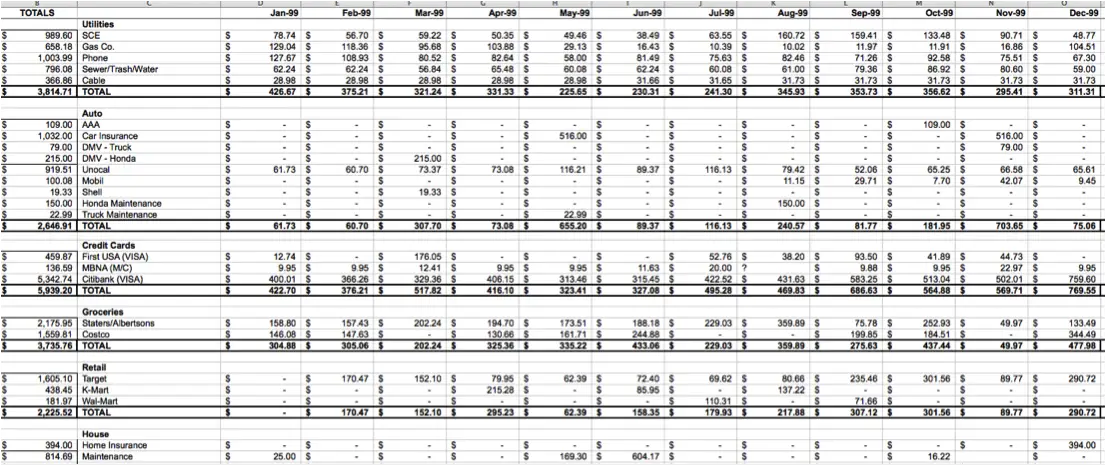
Click on figure to enlarge it.
Although the custom Excel spreadsheet I developed was quite simple in the beginning, it has grown in detail and complexity over the years, with pie charts and graphs that clearly show the results of our household spending and current trending patterns.
Today, my spreadsheet breaks out our household expenses into 13 major categories and 50 subcategories. The major categories include:
- Loans
- Utilities
- Medical & Dental
- Automobile Expenses
- Groceries
- House Expenses (excluding the mortgage)
- Entertainment
- Taxes
- ATM Withdrawals
And A Few More Quick Tips …
- If you’re just starting out, it’s important to make sure you set aside about an hour or so at least once per month for reviewing your checkbook, receipts, and/or credit card statements and recording your expenses in your spreadsheet.
- By frequently updating your financial spreadsheet, you’ll not only be able to quickly catch any potential errors on your billing statements, but you’ll also keep from falling hopelessly behind on your record keeping duties.
- If you’re not an expert in Excel, there’s no need for despair; Microsoft has scores of budgeting worksheet templates for your to download and modify to suit your needs. In fact, their personal budget worksheet template has millions of downloads.
- If you’re afraid of spreadsheets, don’t be – they’re not hard to use! Yes, spreadsheets are extremely powerful tools for those who know how to take advantage of all they have to offer. But for most folks, the basics needed to properly track expenses can be learned in less than 30 minutes.
- If you don’t want to spend money on a spreadsheet such as Microsoft Excel, you can try the free equivalent from OpenOffice. I’ve used OpenOffice before and it’s an extremely capable alternative. You can also take advantage of the free personal finance templates provided by Google Docs.
- Once you’ve effectively disciplined yourself to always spend less than you earn, tracking expenses becomes a viable alternative to budgeting that allows you to focus on optimizing your finances in order to get the most bang for your buck.
- And last but not least, remember this: In the end, it doesn’t really matter what tool you use. What is important is your commitment to actively manage your finances.
Photo Credit: wuestenigel
Excellent post. I agree with your point about some of the great online tools like Mint.com making it too easy and not forcing users to fully understand the data. Maybe its my longtime background of using spreadsheets but I still prefer them for many tasks.
I tend to use them for everything to, Roger. As you and I both know, they can be used for a lot more things than finances; even stuff completely unrelated to math.
Spreadsheets are amazing — and very powerful — tools.
Spreadsheets are good for formulas, sometimes I also use graphs. Sometimes even paid applications
Damn engineers and their OCDness….You make me feel guilty…
I know, Dr. Dean. We engineers just can’t help ourselves.
I originally used excel but switched to quicken when I found a free version laying around my apartment. I have no clue how it got there! I input all of my expenses manually and can look up reports for anything I have entered. I just need to make sure I back it up regularly…
Haha, you’re right – even us Type As avoid entering cash transactions in their Mint accounts (and I have at least one account that won’t update through Mint). I do make it a point to log into Mint twice a month to figure out if anything weird is going on…
Right on, Len. I know a lot of folks cringe at the perceived tedium of tracking expenses, but I agree with you: It’s the foundation of household financial planning, crucial, when combined with a budget, to meeting short, medium, and long term goals. The most important thing is to choose a tool, any tool, dive in and get started!
I use Excel for us too. I only started about 6 years ago though, so it is not nearly as impressive. 😉 My way is a lot simpler than the look of yours though. I have a column that lists categories, a column that lists the budgeted amount we are supposed to stick to, and a column for how much we actually spent…sometimes it’s a yay and somtimes it is a bummer…
I didn’t want to get into the dirty details of mine, Crystal, because I didn’t want to scare anybody off. But my spreadsheet slices and dices the household expenses, as the saying goes, six ways to Sunday. I’ve got about 25 different worksheets covering every year of expenses, plus summary sheets, pie charts, line graphs and other goodies. Only an accountant or engineer would really appreciate it.
Everyone else would just call it overkill! 🙂 lol
Being an accountant, I definitely approve of and appreciate your spreadsheet, Len. 🙂
Please share the spreadsheet from 1999. It should be the most basic.
I would not call your sheet overkill.
My Grid now has the capability to know (and tell me) when a vehicle needs an oil change, two weeks before it is due.
Could I possibly get in on that sweet spreadsheet action?
I have a question, Len. When you enter your totals into your Excel workshop for say groceries, do you enter the amount you paid plus the sales tax, or do you leave the tax out and put it in a separate category?
The taxes, if any, are included in everything, Belinda. 🙂
Thank you! 🙂
Hello,
I get hung up on a similar detail. What do you do with the sales tax when your receipt falls into multiple categories? For example, I might get groceries, household goods, and health/beauty items all in the same trip.
Thank you 🙂
I would spread the sales tax proportionally, Miranda.
For example, let’s say you have a receipt showing you spent $99 with 10% sales tax. If your receipt was broken out like this …
Groceries $40
Household goods $30
Health/beauty $20
Sales tax $9
… then you could apportion your sales taxes evenly at 10% for each category (so, $4 for groceries, $3 for household goods, $2 for health/beauty).
So your $99 bill comes out to $44 for groceries ($40 + $4), $33 for household ($30 + $3) and $22 for health/beauty ($20 + $2).
This may not always work perfectly when groceries are involved because not all groceries are taxed, but it is close enough for government work!
Thanks, Len! Good ideas seem like they should have been obvious once someone else points them out. 😉 This is working splendidly!
The spreadsheet is great because you can easily summarize columns and link numbers from tab to tab to compare month to month.
We recently switched to just a standard spreadsheet to track our expenses (instead of using quicken/mint), because it really holds us accountable to see the debits and credits side by side in realtime.
Spreadsheets are still the most used tool for most of the businesses. As a matter of fact still around 85% of financial sector uses spreadsheets.
Off late the demand for spreadsheets have drastically gone up. With the entrants such as CollateBox the stage is set pretty big, I have been privileged to use Collatebox for managing and tracking sales n finances n am enjoying the tool.
I use Excel also. It works for me. I think what’s important is whether you’re comfortable using it.
“…a *panoply* of options”??
Panoply (noun): a wide-ranging and impressive array or display…
Apparently, it also means “a complete suit of armor”. 🙂
I like using a spreadsheet too because of the control. Plus I can really customize it. You are absolutely right—you will discover your money leaks. After reading one of your comments, it sounds like you have your own system of creating spreadsheets!
Len, I also use excel to track my expenses. I built mine around a main check register that will account for up to 10 bank accounts. It then aggregates everything into a budget sheet and has a few charts and other goodies. I would be very interested in seeing your spreadsheet. I am always looking for ways to further “geek” my spreadsheet out. Would you be willing to share a blank version of your spreadsheet with your audience? Thanks and keep up the good work!
I can do that, Matt. It’s going to take me a bit of time to “sanitize” it though — I’ll work on that this weekend and try to get it to you as soon as I can. 🙂
Thank you!
I’d be interested too in a generic version to see how you split things out. Thanks!
Len,
Any luck on sanatizing your budget worksheet? I am still interested.
Thanks!
I have to beg for your patience, Matt. It’s on my to-do list. I’ve just been really busy. I hope to get to it not to long after I get back from FINCON. 🙂
Hi Len,
Great post! I just recently got married and was comfortable using a basic version of quicken on my laptop. Unfortunately that system isn’t working for me anymore. In addition to groceries and monthly bills, I’ve realized my expense tracking will now have to include a large array of categories that are not easy to track via quicken. I was wondering if you might be able to send me a blank version of your spreadsheet. I’m an account by profession and I can definitely understand the interest in details as well as the unlimited possibilities in analyzing the trends of a personal budget. Thank you in advance.
Can you please send me a copy of your general excel that you sent to Matt?
Thank you.
I too would be interested in a copy of your excel that you use.
Thanks!
You got it, John.
Hello!
Newbie here. Is there a way to get a copy , or can I pay you for a copy of your spreadsheet?
Thank you for the great article and resources here.
Oh and by the way, I am an accountant, so I really do appreciate this sort of thing!
I’ve used Microsoft Money for more than a decade now for my personal finances and love it. As it’s a sunset product (no longer supported or developed) you can also download it for free from Microsoft.
Nice write-up.
I use Excel too. I have a smart phone and the file is in Google Doc. Each time I spend I just write it in the spreadsheet and I clean everything up once a week.
The problem is my partner who instead of having a smart phone – refuses to do so. 😉
I bought a day planner for 99 cents and use the month pages to track all of my daily spending that is not regular bills (since January). It makes me really aware of what I am spending money on. But I use Quicken for weekly check-in’s of my regular expenses.
Hi Len, I signed up for your newsletter approx. 20mins ago. Enjoyed what I read/scanned as I had a quick look around. Came across this post & found it interesting. One thing I like to do, which I know is rather simple, however it gives me peace of mind, is manage my outgoings/cash flow. I HATE any bills that turn up that are a SURPRISE. As we all know household bills incl. mortgage/car/insurances etc. are relentless. What I like to to do is auto-pay everything weekly, so I don’t even have to think about it. So I just calculate the yearly cost of anything & everything, divide by 52 (weeks) & that is what I auto-pay each week to everyone. (don’t ask any providers ‘can I do it’, just do it – they won’t knock the money back). That way when any regular bill/account arrives I’m normally in credit with them at least a few dollars. Since reading this post however, I’ve added another row item to the spreadsheet & called it ‘Savings’, so hereon in each week I’ll be paying myself also without thinking about it. Sorry if this is all really simple stuff, it’s just that for me I love simple solutions w/good outcomes.
I’ve been using Mint.com for sometime to track my expenses. But after reading this, I think, I need to use spreadsheet for the same!
Thanks!
For my budgeting I use “You Need a Budget” or YNAB for short. It has the benefits you get from using a spreadsheet that you have to enter in your expenses as you go. YNAB saves you from having to get the spreadsheet to properly manage categories and budgeting. The greatest thing about YNAB is that it has a great facility to allow you to budget for the future. Too often we are spending our time trying to track the expenses of the past. But only once you are able to budget for and influence future spending decisions do you get the greatest benefit. The other thing I like about YNAB is that they teach a budgeting method and the software helps you to implement that method correctly. I’ve used mint.com and excel in the past and now that I’m using YNAB I don’t plan on going back.
I use a similar Excel format and added columns that list the interest rate on the credit accounts. That way I can make extra payments on the highest interest accounts.
Have a question..how do you account for line items on your sheet like clothing, household items, bills that are part of your monthly credit card bill without duplicating the charges on both line items. It seems confusing to me – this is because i have credit card debt that i am trying to pay off and carrying the balance forward every month is muddling it up.
Thanks
Ami
Hi Ami,
Did you ever come up with a solution? I’ve been trying to figure out the same thing. I want to put all of my purchases, be they debit, credit, or cash, into their appropriate categories. I also have a Loans category for payments I make toward any debt. I’ve been trying for a week to come up with an elegant way to make both my category subtotals and my giant pie chart total make sense, but I’m still coming up blank.
Hope you’re having more luck! If so, please share! 🙂
We use an Excel spreadsheet to track our budget AND to track our investments. As we have moved from job-to-job and roll funds out of a 401K into IRAs, we can see our net worth, diversification allotment, etc. We even track management fees, fund sector, etc. Some may say it’s overkill, but we know our net worth to within a few hundred dollars. At the end of the year, we make adjustments to our 401K selections to rebalance our funds going forward. We believe you have to know where you are so you can journey toward your retirement goals. We didn’t get our spreadsheet like this overnight. We started with the basic money-flow spreadsheet like you suggested and just gradually added to it. At the end of each year, we also ask ourselves, “What can I do to make this spreadsheet more useful?” After you get the format and formulas set, it’s just taking time to update the numbers on a regular basis.
I’m very interested in a blank copy of your budget as well. Thank you!
We’ve been using a simple excel sheet for expense tracking for quite some time now, we would greatly appreciate if you could share your excel sheet template.
I started tracking my expenses with a sheet of notebook paper, a pen and a calculator (Really, I’m not THAT old, just a Luddite). After marriage and kids, I made an Excel spreadsheet. In some ways, I think it was easier back in the good ol’ days before using this new computer doohickey, but my expenses were easier back then, too.
i was searching many application because i think applications are better than Excel. After i found this website and use ur recommendation on Savvy Spreadsheets, now i’ve changed my mind to using sheet Excel.
Thanks
I have started tracking my expenses in a spreadsheet too, but it is very difficult to update the table of a Google spreadsheet on my smartphone and if I wait until I get home, usually something is going to be forgotten to be tracked. That’s why I have opted for an Android app (Money Lover) for tracking my expenses, since I can add any expense with ease whenever I pay. The app allows me to export the data in CSV format, so I can write my own application that creates the reports I want to see.
I update my spreadsheets just about every day. I LOVE having an exact record of everything at my fingertips that I can pull up in a matter of moments.
I use Google Docs – available anywhere on my cell, that way. I started with a free budget template that I have customized over the years.
Love Excel spreadsheets! I’ve gone the opposite way of you though. Mine started very complex with multiple tabs, graphs, and charts and has simplified over the years. Today I use a smartphone app to categorize and track all expenses, I input everything at the point of sale and then do a quick balancing once or twice a month to make sure there are no discrepancies. My spreadsheet now has one tab per calendar year that I use to track net worth, I did include a monthly expenses vs income section to it to see cash flow but no more graphs. It’s easy and works best for me, but to each their own. What’s important is you do it and stick with it.
Also agree that over automation is bad. I automate “paying myself first” and utility bills but found if I automated my credit card payments I was more likely to over spend and not notice the money leak even though I was still tracking all the transactions.
I am SOOOO going to show this post to my husband who asked me two days ago whether recording our monthly spending and income was “worth it”.
I use the Money and Mint apps and Excel to track income, expenses and net worth. There’s nothing like seeing it on paper to know whether your behaviour is in line with your goals.
I use both apps and spreadsheets. Apps gives me alerts and can set up buckets etc but spreadsheets I’m able to manipulate (in a good way). The data I get from the apps help me track my finances details and with excel I look at the grand picture. I went from multiple tabs to 3. This is stored on Google Docs with access given to some family members in the event of my demise (not morbid just planning).
I think I’ll steal your idea. I do have various tools to do this, but tracking expenses via a spreadsheet would allow me to customize it to my real needs.
Hi. I love your spreadsheet and saw that you mentioned that you would make it available. Has this been done, if so where can I get it.
If someone likes mint.com and wants to get their transactions into an excel budget in one easy step, xlyourfinances.com has a one click conversion to get the mint “.csv” download into a format that then ‘posts’ with past transactions which are summarized and compared to your budget.
Is your budget workbook available to download?
Your approach to finance tracking is very impressive. I am yet to start on that. Can you please share your tracking sheet structure, if you dont mind.
Thanks.
We’re a family of 7. With 5 kids and lots of medical, school , and extra bills I need help. There’s always money going out faster than coming in. School expenses arise at any time. And then there’s the extracurriculars and money for this and that (clothes, shoes, playdates). How can I keep track of our finances the easiest/quickest way as time is always tight.
Interesting ideas . For what it’s worth , you need a FEC Form 7 , my business found a fillable document here http://goo.gl/ZLdlKf
I’d like a copy of your spreadsheet please and thank you.
I’d love a copy of your spreadsheet if thats possible. I really like the way its set up.
Thank you for this very practical blog post!
Hello,
I am also interested in a copy of your spreadsheet. Could you be so kind and share a copy with me? Appreciate it greatly. Thank you
You got it, Sangtae. I just sent it to you.
I, too, would love a copy of your spreadsheet. I would appreciate it very much. And, Thank you for the great article!
Please,
May I also have your spreadsheet template? I promise I won’t brake it. =)
Also, your newsletter keeps asking me to subscribe. However, I have been a subscriber for several years.
I, too, would love a copy of your spreadsheet. I would appreciate it very much. And, Thank you for the great article!
I just realised this was a 2014 post, but I think your blog post and discussion will always stay relevant! I googled how to start managing finances on excel and got here as I did not want to rely on an app that would not allow me to be self-dependent on managing my own finances.
I am wondering if you would kindly share a template of your own “most effective” spreadsheet? It would really help me out tremendously.
Thank you!
Ann
Hi Len, I’m currently using Quicken but am so tired of all the problems. I’m ready to go to a spreadsheet.
Can you send me a copy of your spreadsheet that you sent to others please? Thank you!
Hello
If it is possible, i’m interested in a copy of your spreadsheet. My husband and I are really overwhelmed and are trying to find a starting point in taking charge of our finances. We want to start setting a good example for are children now. I just stumbled upon you site and found many of your post helpful. I would love to share this with my husband. Thank you.
Hello and thank you! This is a great idea.
Is a copy of the ‘sanitized’ version of your spreadsheet still available? I would really appreciate it if so. My apologies if I’ve missed the link somewhere.
Hi,
This is very useful. I was evaluating budget tracker apps and reading your blog, I feel spreadsheet would be the best option.
Is it possible to share a generic copy of your spreadsheet please?
Best Regards,
Swapnil
Love this post! I agree using spreadsheets is the best way to learn about your finances. I’ve tried using things like Mint to automatically track my spending, but it doesn’t do it quite like I like. Plus, it’s a good exercise to write down the information yourself.
Thanks, Lindsey!
Heard you on Stacking Benjamins today and laughed out loud when you mentioned your spreadsheet. You are the man! I created a simpler one that I use along with Quicken. I set up a spending plan at the beginning of every month and then pull a Quicken spending report and enter the numbers into my spreadsheet. Its a great way to see how much you can spend and if you went over budget because you spend too much on liquor!! I always tell friends if Im broke I know exactly why. Love listening to you!
Awww, thanks, Kim!
You know, I’m pretty old, but I can still remember the days when I had a beer budget.
I’ve been using excel for over 5 years now to record our expenses, after using quicken for about 20 years. I like the flexibility excel gives you. I now know exactly how much transportation costs us, taxes, food, etc. Couldn’t imagine tracking our expenses any other way. Use a format similar to the publisher. And no I am not a computer nerd.
I know this is an old post, but I started using a manual spreadsheet in pre-computer days and I still use an Excel one that looks something like yours. When my credit union went online, they decided not to allow external software to access their accounts, so I’ve never been able to use anything like Mint, but that’s no problem.
I’ve used an Excel template from Vertex42.com for over 5 years now which is a full-featured budgeting, tracking, and analysis tool with *no macros*! Look for “free money management template” on his website. )
Just tracked my family’s income and expenses for the first time last year using Quickbooks (mostly to learn the software better). Decided not to categorize amounts from the credit cards at all and just list each credit card due to time suck. Happy to see that you did the same. It was a bit painful as I did it 3 months at a time so monthly would be much better. And let me tell you, it was shocking the amount we spend on credit cards. Just because we pay them off each month does not make it OK. Found you through Stacking Benjamins. Great blog!
Thanks, Barb!
Great article Len
I’ve been trying to create my own version of a spreadsheet for quite a while but yours is just what I’m looking for.
Would it be possible to get a sanitized copy of your version?
Thanks so much and keep up the great work.
Thanks, Tim. It’s on its way!
I do agree that doing it that way gives you more possibilities, but it sure is a lot more work than using any tool available for that.
Len: This was really awesome article and I am definitely sharing it with some of my financially challenged friends.
I used to also use a spreadsheet to record my expenses, but I recently gave gini (https://gini.co), which is similar to mint, a shot and it has honestly made life a lot easier. The design is very user friendly and tracking my expenses has been a lot easier!
May I get a copy of your sanitized spreadsheet please? And thank you in advance.
Hi, I enjoyed your article. Could you please email me a sanitized copy of your Excel sheet as well. I would like to use this at our monthly family meeting.
I would like a copy of your spreadsheet. Thank you for the great article!
I would also like a copy of your spreadsheet. I’m not too familiar with Excel, but I do have it.
Thank you!
i came across your site whilst looking for best options on this subject. Like you I love using excel for everything I possibly can think of.. I need your comments/advise on this one nagging problem.. I use my end of the month credit card statement for ease of use, but at the same time, would like to reflect in my excel, for eg. in my mobile phone bills, the amount that was anyways deducted under the credit card column, and not include it in the bottom line, as then it would appear twice.. any work around this situation for all these types which I would like to see separately though its accounted for in the credit card column. thanks in advance..
Sorab, you can simply alter the “bottom line” equation that sums up all of your expenses to exclude the credit card statement entry.
Len,
I’ve been using a Quicken program since 2005 to track my expenses, and I like it’s simplicity and organization. Sometimes I have trouble printing out reports, and I don’t like the new web-based programs that are expensive and want to tie credit cards, bank accounts, etc. to my basic money tracking. I enter my income and expenses manually, from my credit card statements, checking account, etc. and don’t mind doing that, as a review of my expenditures, and to check that I recognize all my expenses. Your spreadsheet sounds like just what I’m looking for. I’d appreciate it very much if you’d send it to me.
HI Len,
I cannot find your Annual 2017 and 2018 state of the household reports, I really miss those and think they are your best posts to reflect on the whole year and how you did – do still post these? Please send.
Thanks,
Sean
Do you have a post showing all of your expense categories? I’m building a new spreadsheet this year so I can add in child costs and better save for the future. I would love to know what categories others use (I think mine may be too detailed at the moment)
Totally agree about Excel. I’ve tried the mobile apps and simply can’t get into it. With the turn into the new decade, I just realized my wife and I have been doing our spreadsheet for 10 years. The amount of data you can build over time is really impressive. And, of course, the purpose of that data is to help you make better decisions going forward.
I appreciate your level of detail on your tracking. I have been struggling trying to find the right format for all my data. Do you have a cleaned, downloadable version of what you have created available? I’d love to see how mine could be improved.
Would love to see the cleaned up version as well. I work with spreadsheets all the time and have been trying to find a way to get handle on it all.
I like how you explained that a person can learn how to use a spreadsheet in under 30 minutes. This is great for anyone who isn’t tech-savvy. I don’t know a lot about spreadsheets but I would love to put my budget on one so I’ll try and learn about them later this afternoon.
Len:
I would appreciate a copy of spreadsheet too.
Thanks,
Levi
Hi I’d love to get a copy of your spreadsheet as well!
Love your article!
I have used an Excel worksheet for years and want to revise it. I came across your website during my search and appears that your worksheet is what I need. Please send it to me.
Hello Len,
I am tracking my family’s expenses for the last couple of years in excel. Recently I have started categorizing the expenses in more details to better track which category our family is spending money and which category our yearly expenses increasing etc.
I was searching for templates for guidance on how to do the tracking and came across this post. Is it possible to send me also the sanitized version of your tracker?
I have read through some of the other posts here, thank you for sharing. I’ve subscribed to your newsletter as well.
Hi Len, I’ve been working with a spreadsheet for a little while but really like your simple layout. Could I please get a sanitized copy of your spreadsheet ?
I’ll modify it for my needs and it would help me out a lot.
Thank you so much.
Even if you leave the engineering profession, an engineer’s mind is programmed in how they do things. I left, and still do paper spread sheets. Every single time I spend even a few cents, it’s recorded.
You definitely better be prepared if Len or I do a presentation.
“Hold on! I’ll get the spread sheets!”
haha
You got that right, Bill!
I use Quickbooks as I need it for my job (Accountant) so it’s already bought and paid for. We (I) must be type AA because we also track our cash expenses. But we do use a lot of cash. My wife prefers cash so our compromise is that she (we) write it in a notebook we keep in the kitchen and then I type it into quickbooks once a month. The key is to do SOMETHING because even as diligent as we are, and my natural inclination towards finances because of my job, we are still surprised sometimes by the amount of money that went “missing” (which is not really missing, just waiting to be discovered in my bookkeeping).